aving a Ryzen 9950X3D & RTX 5080 Beast from Stuttering Hell to a Locked 1,000 FPS in CS2
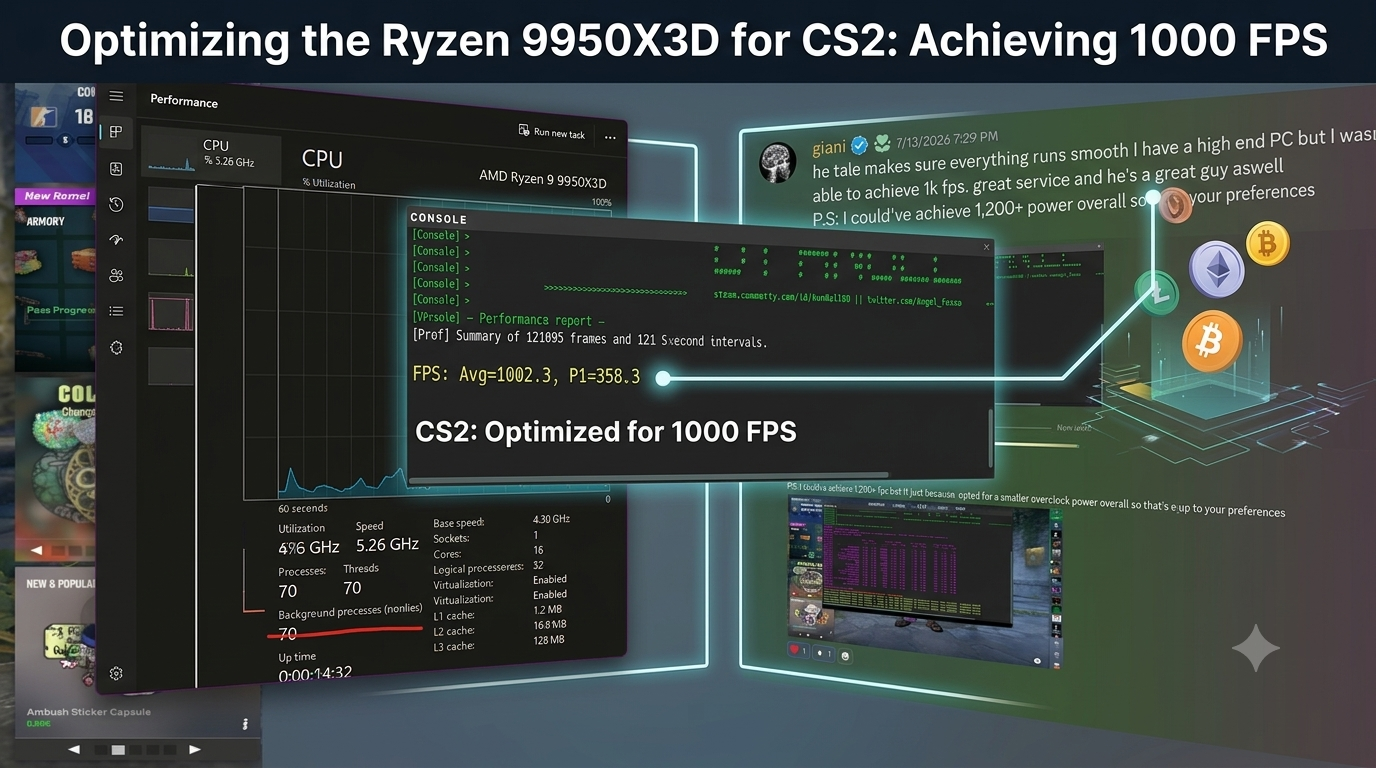
Imagine spending thousands of dollars on a dream gaming rig—specifically, an AMD Ryzen 9 9950X3D paired with an NVIDIA GeForce RTX 5080—only to load into Counter-Strike 2 and watch your gameplay stutter, lag, and struggle to stay around 650 FPS.
That is exactly the nightmare one of our recent clients was living. After a terrible experience trying to get help elsewhere, he came to our Discord server. Here is how we turned his machine into a competitive, cool-running CS2 powerhouse in under three hours.
The Fiverr "Ghosting" Experience & The 4-Minute Rescue
Before finding us, the client decided to try his luck on Fiverr. He paid an optimizer who promised the world, only to hit him with the classic: "We will do it tomorrow." When tomorrow came, the seller went completely radio silent, forcing the client to pull the plug and get a refund.
Frustrated but still determined, he joined our Discord server and opened a support ticket at 4:24 PM.
Speed is everything. We didn't keep him waiting. By 4:28 PM—just four minutes later—we were actively diagnosing his issue and mapping out a realistic plan of attack.
Initially, the client was eyeing a benchmark screenshot of someone hitting 1,200+ FPS and wanted to chase the exact same number. However, he made one major condition very clear: he did not want any extreme overclocking, extra voltages, or high temperatures.
We explained that while his hardware was absolutely capable of pushing 1,200+ FPS, doing so would require pushing higher voltages and thermal limits. Since he wanted a cooler, highly stable, and safe system, we suggested aiming for a locked 1,000 FPS on an undervolted profile instead. He loved the idea of prioritizing smooth gameplay and safety over raw, melting numbers, and we got straight to work.
Why We Offer a Free PC Check First
Before we even sent over our crypto address for payment, we ran our standard free PC check.
We do this for every single client to ensure optimization is actually worth their money. If a client has a hidden hardware issue, an outdated system that simply needs an upgrade, or something else that optimization won't fix, we tell them upfront. We are here to deliver real results, not waste your hard-earned money.
Once we confirmed his beastly hardware was healthy, he completed his payment in crypto, and we jumped into the system.
The Diagnosis: Behind the Stutters
Once we remoted into the PC, it didn't take long to find out why this massive rig was choking. Even on top-tier hardware, bad software configuration will ruin your 1% lows and frame pacing.
Bloatware & Junk: The Windows installation was bogged down with unoptimized files and cache.
A Background Process Parade: The Task Manager showed an eye-watering 345 active background processes running at idle.
Severe Idle RAM Usage: The system was eating up 12.3 GB of DDR5 RAM (40% utilization) before a single game was even launched.
RGB Conflicts: The client had multiple conflicting RGB software programs running simultaneously, constantly fighting for CPU cycles and causing massive micro-stutters.
With over 12,000 hours of personal experience in Counter-Strike, I knew exactly what CS2 needed to run at its absolute best.
The Solution: Optimization & Cool-Running Undervolt
Instead of pushing dangerous voltages, we focused on efficiency and thermal control:
Safe Undervolting: We applied a precise, stable undervolt to the Ryzen 9 9950X3D. This kept temperatures incredibly low, reduced thermal throttling, and allowed the CPU to sustain its boost clocks effortlessly.
Process Purge: Cut down the active background processes from 345 to a bare, gaming-optimized minimum.
RAM Recovery: Cleaned up the idle RAM usage so CS2 had unhindered access to his ultra-fast Corsair DDR5 memory.
RGB & Bloat Cleanup: Uninstalled the conflicting RGB suites to eliminate the micro-stutters they were causing.
CS2-Specific Tuning: Fine-tuned engine commands, OS thread scheduling, and GPU control panel settings to perfectly match his high-end setup.
The Result: Cool, Quiet, and 1,000 FPS
By 7:25 PM—exactly three hours after he first reached out—the work was fully completed.
The client booted up the CS2 benchmark, and the numbers spoke for themselves:
Average FPS: 1,002.3 FPS (Optimized on a cool undervolt)
P1 Lows: A rock-solid 358.3 FPS
Gameplay Feel: Silky smooth, incredibly responsive, and completely free of the stutters that had been plaguing him.
The Client's Review:
"he takes time with you and he makes sure everything runs smooth I have a high end PC but I wasn't able to achieve 1k fps only had 600 before this, great service and he's a great guy aswell P.S: I could've achieve 1,200+ fps but 1k just because I opted for a smaller overclock power overall so that's up to your preferences"
Is Your PC Reaching Its Full Potential?
Whether you are running a budget build or a top-of-the-line RTX 5080, poor optimization and software bloat will hold your hardware back.
Don't risk your system with unsupportive sellers. Join our Discord, take advantage of our free PC check, and let’s see what your rig can really do!