How We Fixed Instant CS2 Crashes & Hit 1000 FPS on a Ryzen 9800X3D / RX 7900 XTX
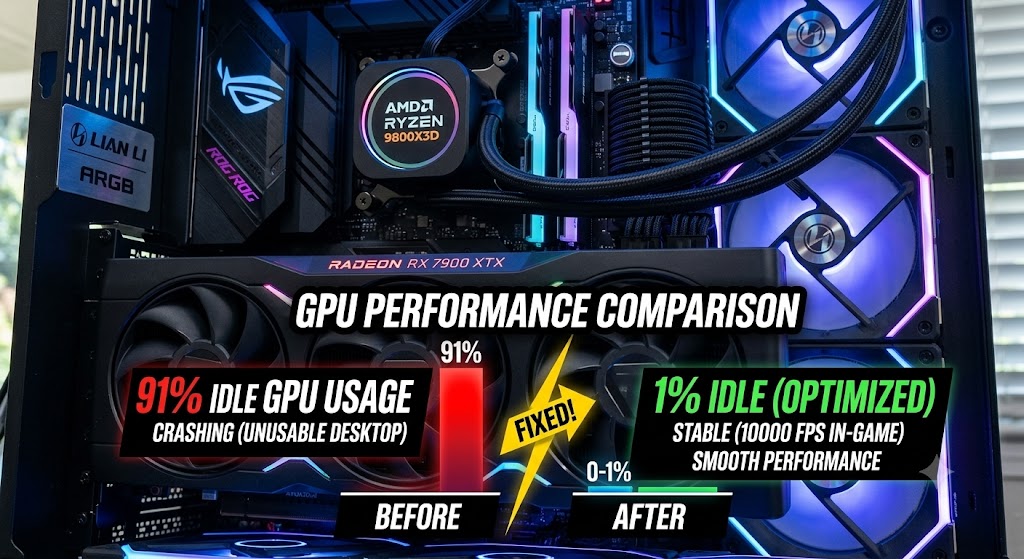
What do you do when a top-tier gaming PC—packing an AMD Ryzen 7 9800X3D and a powerhouse Radeon RX 7900 XTX—can’t even launch Counter-Strike 2 without immediately crashing to the desktop?
That’s exactly the headache an old client of ours faced this week. Despite having some of the fastest gaming hardware on the market, CS2 refused to run.
Here is how we diagnosed the hidden culprit, cleaned up a corrupted system, and fully optimized the rig to pull an astonishing 1000 FPS with rock-solid stability.
The Initial Diagnostics: A Hidden GPU Drain
When the client first reached out, we went through the standard troubleshooting checklist:
Updating Graphics Drivers: Essential after recent game patches, but it didn't resolve the crashes.
Checking Prerequisites: Verifying DirectX and Visual C++ Redistributables were fully up-to-date.
Reinstalling the Game: Testing the installation on a completely different SSD.
With the basic fixes failing, we connected remotely to the PC to investigate further. The moment we opened Task Manager, the main culprit jumped out at us:
The GPU was running at 91% utilization on the Windows desktop with absolutely no games or heavy applications running.
Having your graphics card pinned near maximum load while idle is a massive red flag. It starves games of the resources they need to launch, leading to instant crashes.
Digging Deeper: The BIOS Reset Trap
Upon further inspection, we uncovered a cascade of other system issues:
The BIOS Reset: The client had recently performed a BIOS update. While updating is great for security and compatibility, it completely wiped the custom RAM, PBO, and undervolting profiles we had set up last year.
Sluggish Memory Speeds: Because of the reset, the high-speed DDR5 RAM had reverted to its sluggish default speed of 4800MHz, heavily bottlenecking the Ryzen 3D V-Cache processor.
Messed Up Windows Environment: Over time, background processes had piled up, driver states were fragmented, and Windows system settings were severely misconfigured.
The client gave us the green light to go beyond a simple crash fix and perform a full-system performance optimization.
The Solution: Step-by-Step Optimization
To bring this beast back to life, we executed a top-to-bottom optimization protocol:
1. Re-Tuning the Hardware (BIOS & RAM)
We went back into the BIOS to restore the hardware to its absolute peak efficiency:
Precision Boost Overdrive (PBO) & Curve Optimizer: Hand-tuned a stable CPU undervolt to lower operating temperatures and allow the Ryzen 9800X3D to boost higher for longer.
RAM Optimization: Re-enabled high-speed memory profiles, manually tightening the sub-timings to dramatically reduce latency and boost minimum 1% low FPS.
2. Deep Driver Cleansing
To fix the massive 91% idle GPU load, we performed a clean slate driver installation:
Used Display Driver Uninstaller (DDU) in Windows Safe Mode to completely purge all remnants of old, corrupted AMD driver files.
Installed the latest stable Radeon drivers and configured the software specifically for competitive, low-latency gaming.
3. Windows & OS Streamlining
We stripped away the bloatware causing high background activity, optimized Windows power delivery, and eliminated unnecessary OS overhead to ensure the lowest possible input delay.
The Results: 0% Idle, 1000 FPS, Absolute Smoothness
The transformation was immediate:
Idle GPU Usage: Dropped from a suffocating 91% down to a clean 0% to 1% on the desktop.
Thermal Performance: Lower CPU and GPU idle temperatures due to efficient power curves.
CS2 Performance: The crashes completely vanished. The client was able to launch the game smoothly, hitting a blistering 1000 FPS with unmatched responsiveness and zero stutter.
Stop Playing on Default Settings
This case study is a perfect example of why hardware is only as good as the software driving it. A simple BIOS update or a corrupted background process can quietly rob you of 30% or more of your PC’s potential performance, or stop your games from working entirely.
Unsure if your system is running at its best? We offer a 100% free PC check before any payment. We will scan your system, check for hardware bottlenecks, outdated BIOS states, or driver conflicts, and let you know if a professional optimization is worth it for you. If your system is simply too old or has a hardware issue, we'll tell you upfront so you don't waste a single penny.
[Get Your Free PC Check & Optimize Your System Today!]